Events Manager
The Events Manager is your one-stop shop for managing conversion events shared with Reddit. In the Events Manager, you can:
- View event activity: See your conversion events data over time.
- Set up events: Use the event setup tool to share conversion events with the Reddit Pixel.
- Open event details: Check the effectiveness of your Pixel and Conversions API (CAPI) integrations.
- Trigger and test conversion events: View and troubleshoot events in real-time to find issues in your integration.
- Create conversion access tokens: Easily manage access tokens to send conversion event data from your server to Reddit.
- Edit attribution settings: View and change your attribute type and window.
View event activity
All event counts are pre-deduplicated. Learn about event deduplication.
See your event performance over time in the event activity graph:
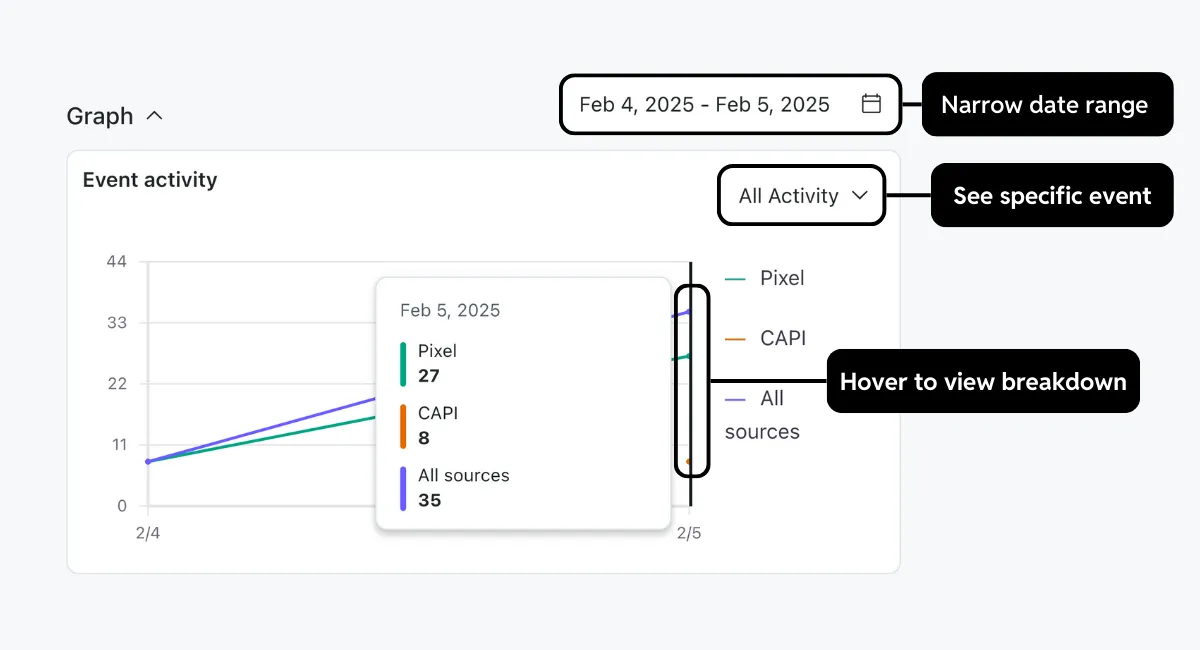
- Narrow date range: Adjust the date range to see only activity in a specific time frame. The maximum recommended lookback period is one year from today’s date. By default, this shows the past seven days.
Integration-specific data became available starting November 19, 2024. Dates before this will show a single All sources line.
- Specify conversion event: Choose an event from the drop-down menu to narrow data to only that event.
- View breakdown: Hover over a dot to see the exact number of total events for that date. If you’ve integrated both the Reddit Pixel and CAPI, you’ll see a breakdown by integration.
Integration-specific data isn’t available before November 18th, 2024.
You can view more details on your standard or custom conversion events in the event activity table:
- Save as CSV: Export the table as a CSV file.
- Switch event type: Choose to view data for standard or custom conversion events.
- Open event details: Select a row to view additional details about that specific event.
- See last time received: Hover over the Pixel or CAPI event count to see the last time that event type was received from that integration. A warning appears when the event hasn’t been received in the past six hours for the Pixel or 48 hours for CAPI.
- View issues: If your event’s status is warning or error, you can hover over the warning indicator to display more details and jump to event diagnostics. Learn more about the columns in the table.
Table reference
| Column | Description |
|---|---|
| Event | The conversion event being measured. |
| Status | The current status of your events, which can be one of the following: Note: The highest severity will be shown if your event has multiple issues.
|
| Total Raw Events | The number of times this event has fired during your set duration, including unattributed events. The last time this event was fired will also be listed here. A warning will be visible if this event hasn’t been triggered in the past 24 hours. Pixel Events |
| CAPI Events | The number of times this event was shared by the Conversions API. |
| Source | The active integrations for your event type. This value will be partner if you integrate with one of our partners. Hover over partner to show the partner you integrated with. |
View event details
The event detail panel helps you evaluate the effectiveness of your event’s performance across integrations. Information is spread across several tabs:
- Event metadata: Shows the coverage of additional information associated with your conversion event. Higher coverage, validity, and match rates help ensure customer actions are accurately attributed to specific products in your catalog. Hover over a warning to view suggested fixes.
- Match keys: Displays coverage of user and device information shared with conversion events. A higher coverage score helps attribute multiple actions to the same user.
Match key coverage data is only available from July 1, 2025, onwards.
- Deduplication: Check whether your events are being double-counted across integrations.
- Domains: Lists all domains detected and helps validate event volume when sharing data from multiple sites. Learn how to send domains with CAPI.
Some domains may not appear if they’re undetectable or represent less than 0.1% of this event’s total volume.
Event deduplication panel
The event deduplication panel lets you gain insights into how effectively your events are being deduplicated based on conversion ID.
Here’s what you can view in this panel:
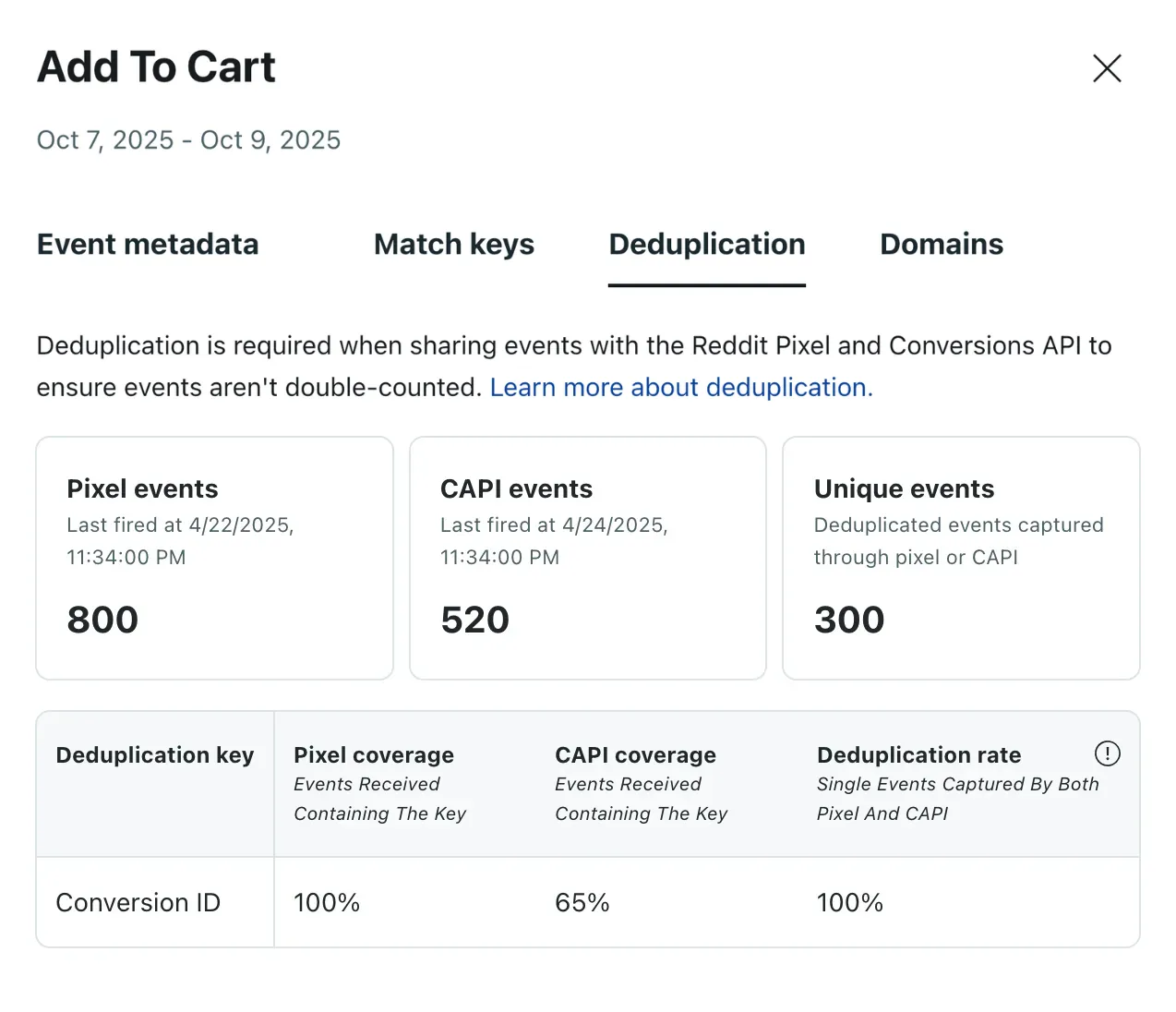
Adjust the data range in the event activity graph before opening the panel to view data for a specific time period.
- Events fired by the source: The total number of events fired for the Pixel or CAPI. You’ll also see the date and time when the event was last fired.
- Unique events: Events sent only by the Pixel or CAPI, not both. These events won’t be deduplicated.
- Source coverage: The percentage of events that include a conversion ID, indicating how much of your event data qualifies for deduplication.
- Deduplication rate: The percentage of events matched and deduplicated based on a shared conversion ID, across sources or within the same source. A high rate may indicate repeated use of the same conversion ID. This metric is updated hourly.
Rates may be slightly delayed from coverage hours.
A healthy rate range would be around 50% within a margin of error. Pixel and CAPI should have similar event volumes, with slightly higher volumes typically reported via CAPI.
Learn how to set up deduplication with conversion ID.
Best practices
- Monitor the event activity table regularly. Verify event counts look accurate and that your integration methods are firing correctly, especially after making implementation changes. Frequent checks can help catch sudden drops in event volume.
- Aim for high coverage rates for event metadata, match keys, and deduplication. Strong coverage improves event data quality, which enhances attribution accuracy and campaign performance.
- Compare Pixel and CAPI data. Toggle between integrations in event details to identify gaps. Look for actionable insights for your development team, such as missing email addresses or mismatched user identifiers between integrations.